
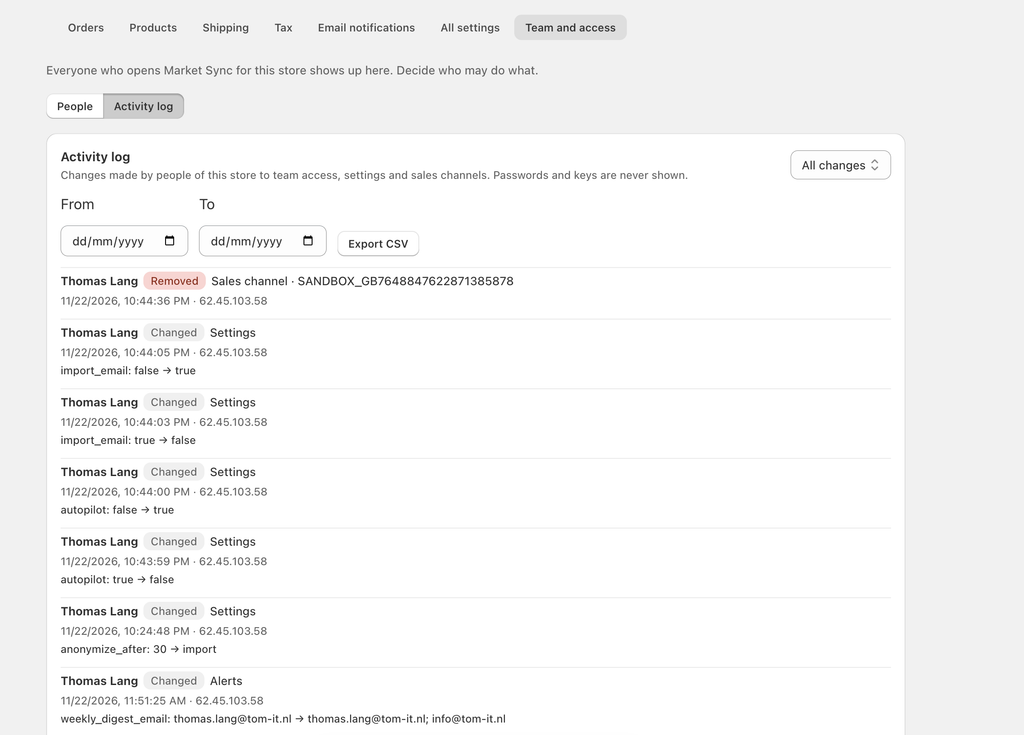
Under Settings → Team and access there is now an Activity log, next to the People overview. It shows who changed what in your store’s Market Sync setup, and when. So you can see, for example, who changed someone’s permissions or edited a sales channel.
What is recorded
- Changes to team members and their permissions
- The access mode
- Sales channel connections and settings
- General settings and email notifications
- People joining the team
- Refused access attempts
- Exports of the log itself
What each entry shows
Every entry shows the person, the time, the IP address, and the old and new value of every changed field. Passwords, tokens and keys are never shown.
Find and export entries
- Filter: by type of change and by date range, with 25 entries per page.
- Export: download the full log as a CSV file for your own records or an audit. The export covers the whole selected period, not just the page you are on.
Who can see it
Only admins of your store can open the Activity log, and they only see your own store’s entries. Entries cannot be edited afterwards.
